
5G NSA vs SA: Why Your Phone's 5G Icon Might Be Lying to You
Your phone shows a 5G icon at the top of the screen, but the speed feels no different from 4G - and if you’re on a plan advertising “unlimited 5G data,” it somehow still runs out fast. This isn’t your imagination, and it isn’t random. It comes down to how 5G is actually architected, and the fact that phones display the 5G icon under conditions that are looser than most people assume.
Two different ways to build a 5G network: NSA vs SA
Non-Standalone (NSA) runs 5G radio on top of an existing 4G network. Your phone maintains its actual connection - the control signaling - over 4G, while 5G is added on as a data-speed boost when available. The 4G network is doing the real work of keeping you connected; 5G is a supplement, not a replacement.
Standalone (SA) is a completely independent 5G network, with its own 5G core - no 4G dependency at all. Both control and data run natively over 5G.
In India, Jio built its 5G network as SA from launch, while Airtel ran NSA-first and only started migrating to SA in early 2026 - beginning with home broadband (Fixed Wireless Access) and phasing into mobile service afterward. This difference in architecture directly affects the icon-lying problem below.
Why the 5G icon can lie
In NSA networks, phones commonly show the 5G icon as soon as the network signals that 5G is available nearby - before your phone has actually connected any real data traffic to 5G. The tower broadcasts 5G capability in its signaling messages, your phone sees that broadcast, and lights up the 5G icon, even while your actual data is still flowing over the 4G connection underneath.
This isn’t a rare glitch. Independent carrier testing in other countries has found 5G icons showing during purely 4G data sessions a large share of the time on NSA networks - in one such test, one major carrier’s 5G icon turned out to be accurate only about a third of the time.
Here’s a real example, captured with the network-diagnostics app NetMonster on a dual-SIM phone:
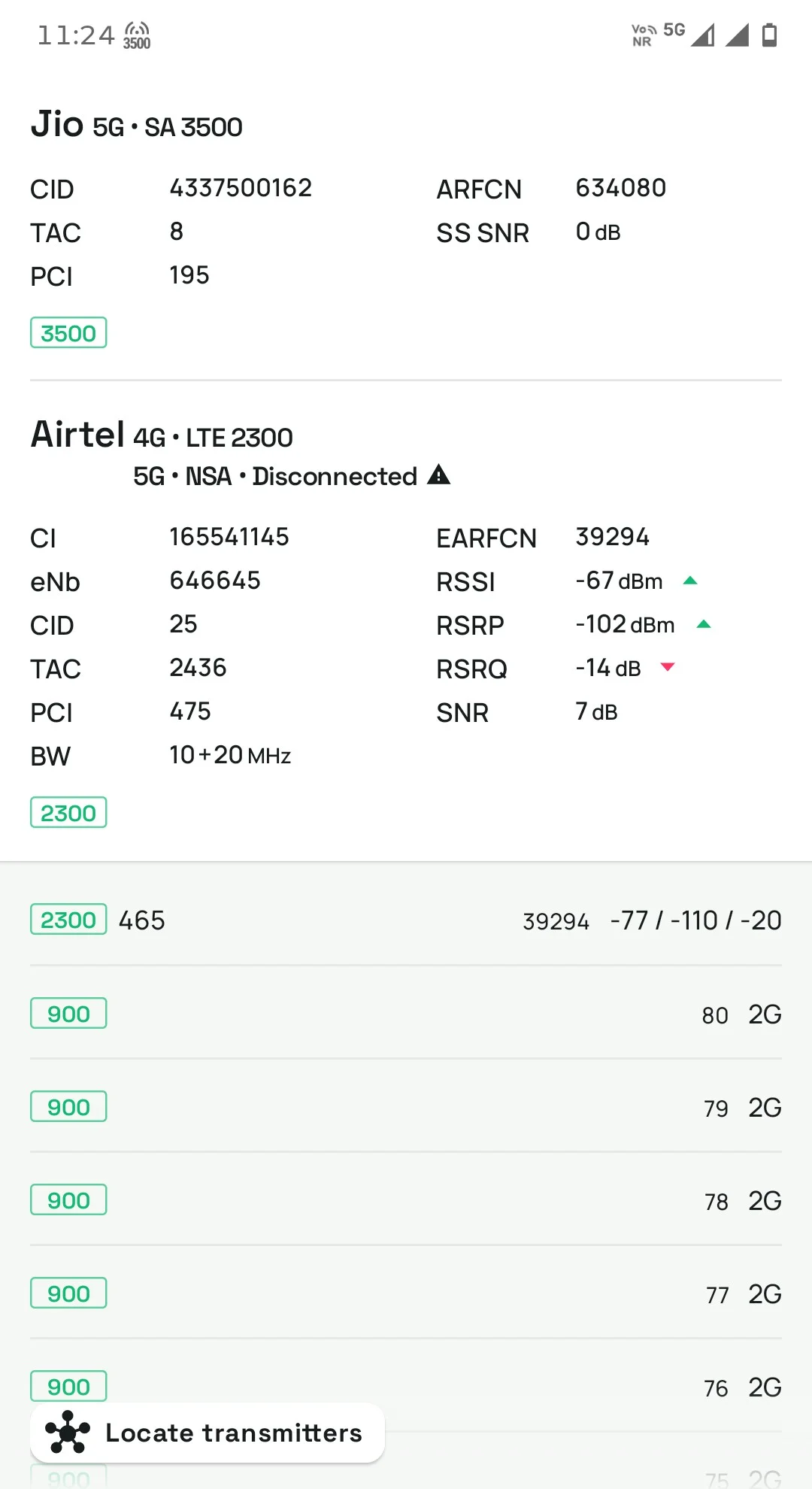
Look at the two SIMs side by side: Jio shows “5G • SA 3500” - a genuine, actively connected 5G Standalone session on the 3500 MHz band. Airtel, on the same phone, shows “4G • LTE 2300” as the actual serving cell, with “5G • NSA • Disconnected” listed right below it - yet the phone’s status bar at the top still displays a 5G icon. That icon reflects that 5G is known to be present, not that this SIM’s data is actually moving over it.
Why this matters for “unlimited 5G” plans
Airtel markets “unlimited” 5G data on certain plans, but the fine print caps it at 300GB within a 30-day period, after which speeds are throttled sharply. That cap only applies to data that’s genuinely carried over 5G - if your session is actually riding on the 4G connection underneath (as in the NetMonster example above), that usage counts against your regular 4G data allowance instead, not the unlimited-5G bucket. This is exactly why some users report their “unlimited” 5G data disappearing faster than expected: the icon said 5G, but a meaningful share of the actual session wasn’t.
How to check what’s really happening
You don’t have to guess. Apps like NetMonster (free, Android) show your phone’s actual serving cell - the real band, the real technology (SA vs NSA vs plain LTE), and whether a 5G NR connection is genuinely active or just broadcast as available. If you want to know whether your data is really moving over 5G before assuming your data usage is protected under an unlimited-5G plan, this is the way to check, rather than trusting the status bar icon alone.
Why 5G also drops out more from obstructions
It’s tempting to think 5G needs a perfectly clear line of sight to the tower - that’s true for mmWave 5G (extremely high frequency, around 26 GHz), but mmWave in India is essentially limited to select venues like airports and stadiums, not general coverage. The 5G most people in India actually use runs on mid-band spectrum around 3.5 GHz (n78) - noticeably higher frequency than most 4G bands (which often run at 900 MHz–1800 MHz), but nowhere near mmWave’s near-line-of-sight requirement.
Higher frequency signals generally penetrate walls and obstructions worse than lower frequency ones. That’s why moving indoors, behind furniture, or even body-blocking your phone can knock you from 5G back down to 4G - not because 5G literally requires a straight line to the tower, but because it’s simply more sensitive to obstruction than the lower bands 4G typically uses.
The Android setting that turns 5G off to save battery
Maintaining an active 5G radio - especially in NSA mode, where the phone keeps both a 4G and a 5G radio connection alive simultaneously - draws more power than 4G alone. Android exposes a per-SIM setting for this: under Settings → Network & Internet → SIMs → [your SIM] → Preferred network type, you can manually restrict a SIM to 4G/LTE only. Some phones also do this automatically under aggressive battery-saver modes. If you’ve ever wondered why 5G quietly disappeared after enabling a power-saving mode, this setting is usually why.
Sources: Airtel’s 300GB fair-use policy on “unlimited” 5G, Airtel’s 2026 migration to Standalone 5G architecture, independent testing on 5G icon accuracy in NSA networks.